What are these sections and articles doing here?
Purpose:
To explain the default structure of the HelloNote Help Center knowledge base and guide administrators in customizing content organization to meet their specific needs.
Scope:
This article covers:
- Explanation of pre-populated content categories and sections
- Overview of the three-level knowledge base hierarchy:
- Categories → Sections → Articles
- Basic content management permissions
Excludes: - Advanced content authoring techniques
- User permission configurations
- Analytics or reporting features
Procedure:
-
Understand Default Structure:
- Navigate to General category
- Review pre-created FAQ sections
-
Modify Content:
- Create: New categories/sections/articles
- Edit: Existing content
- Delete: Default content (if desired)
-
Customize Organization:
- Use guides:
- Organizing knowledge base content
- Creating articles in the Help Center
- Use guides:
-
This FAQ is a section in the General category of your help center knowledge base. We created this category and a few common sections to help you get started with your Help Center.
The knowledge base in the Help Center consists of three main page types: category pages, section pages, and articles. Here's the structure:
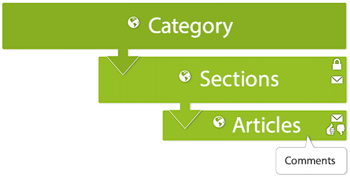
You can create your own categories, sections, and articles and modify or completely delete ours. See the Organizing knowledge base content and Creating articles in the Help Center to learn how.
Comments
0 comments
Please sign in to leave a comment.